Monday, May 7, 2012

Layers


For my layered images, I edited them very little in Camera raw. I only upped the contrast and clarity on most of them. For the the later composite, I used the layer mask and lowered the opacity of the two smaller images. The goal was to combine several of my layering images to make a collage/ composite.

White Balance


White balance allows you to adjust the color of a picture for shooting under different kinds of light. I shot several kinds of white balance. I shot auto, custom, and tungsten. 

Friday, February 24, 2012

Silhouettes- Photographs


When photographing silhouettes,your light source has to be right behind your subject. The light should be strong enough to overpower your subject, so that there isn't as much detail. For my photographed silhouettes, I put my subject right in front of my light source. There was still some detail in my images, but I was pleased with the amount. I edited my images in Camera Raw a little bit. I changed the white balance on some of them to tungsten, so that my wall had a little more color to it. I also upped the contrast, and the blacks a little bit.

Silhouettes


A silhouette is an image of a person, object, or scene that consists of the outline and a basically featureless interior. The silhouetted object is usually black. For my own, digital silhouette, I uploaded an image of myself, and selected it with the quick selection tool. Then, I used the paint bucket tool and filled the photo with black. after that I filled the image with things that I enjoy. I uploaded an image of a piano, and a stage. I also uploaded some stage lights, and changed the hue and saturation so that the colors appeared more different. At the bottom of my picture I uploaded an image of a crowd. I put an outer glow on them.

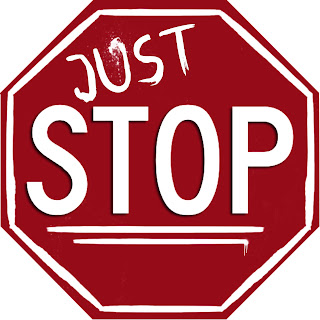
"Just Stop" Logo

This project was for a bullying campaign at school. The people in charge wanted a simple, once color logo that got their point across.
For this project, I got an image of a stop sign from the internet, and selected it with the lasso tool. I also selected the letters, and copied and pasted all of that on to a new document. To make the outline lines around the stop sign, I used a brush. I changed the andle of each line so that is would properly connect with the others. For the writing on the sign , ("just') , I downloaded a graffiti font. I also downloaded some spray paint brushes to add on the sign.

Friday, January 13, 2012

Song Lyric Project


For this project, I broke apart the lyrics of one of my favorite songs by Adele. I made a collage type image, with pictures of her. I also downloaded some fonts and included the lyrics of the chorus of the song. I put a threshold on one of the images of her. I really like the way it looked. I also included some splatter brushes, to give the image a little color. I lowered the opacity of the two other images of Adele, so that they would blend in a little more.

Monday, December 5, 2011

Aperture-Depth of Field


Aperture means "an opening". Depth of field is the region of a photo that is focused when the image is captured. If the depth of field is short, with an aperture of 3.5 to about 7. The image won't be in entire focus. With a long depth of field, having an aperture of about 11-25, the image is more focused.